
Most Salesforce architects treat Prompt Builder like a text editor with merge fields. That works until you hit 1,000+ users generating 50,000+ prompts per day. Then you discover the real constraint: prompts are code, and code without architecture becomes technical debt.
Salesforce Prompt Builder best practices start with one shift in framing. It’s not about writing better instructions. It’s about designing prompt systems that remain maintainable when your org has 200 templates, 15 business units, and zero tolerance for hallucinations in customer-facing outputs.
The Problem With Prompt-as-Text Thinking
The typical approach: business users write prompts in Prompt Builder, test them with a few examples, deploy to production. This creates three failure modes.
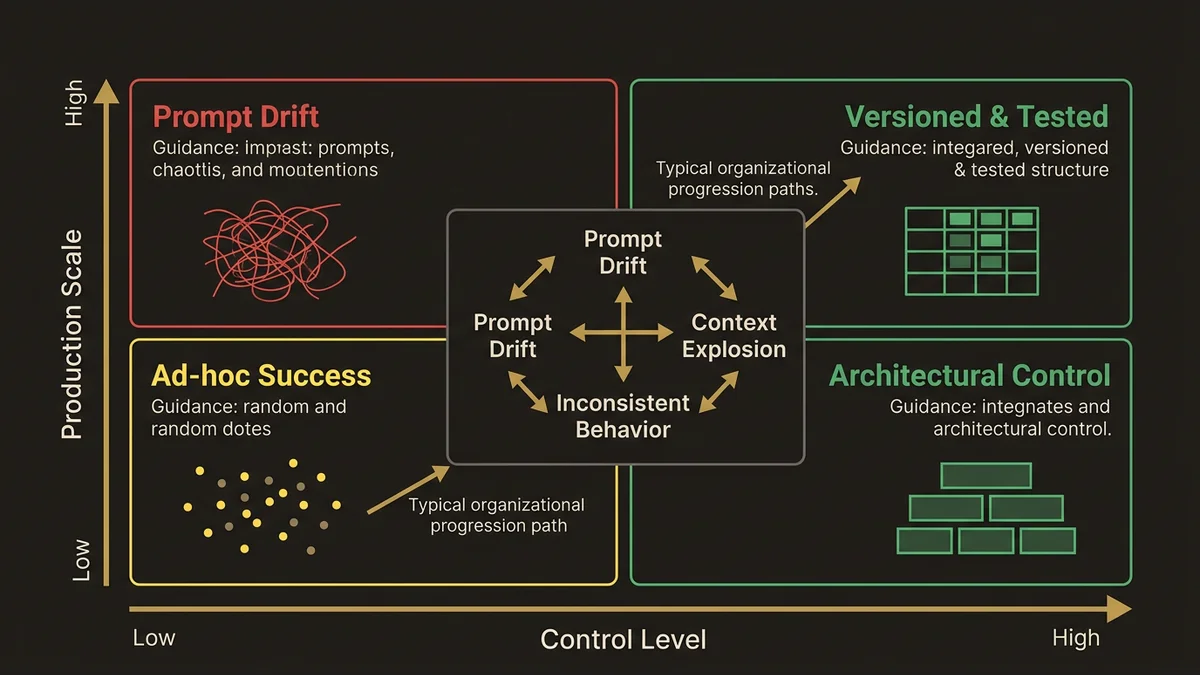
Prompt drift. Without version control or testing frameworks, templates evolve through ad-hoc edits. Six months later, nobody knows why a prompt includes specific instructions or what happens if you remove them. The Sales Email template that worked in January fails in July because someone changed a merge field reference.
Context explosion. Users add more grounding data to fix edge cases. The Field Generation prompt that started with 3 merge fields now pulls 15 objects and hits token limits. Performance degrades. Costs spike. Nobody knows which fields actually improve output quality.
Inconsistent behavior across templates. Each business unit creates its own prompts with different instruction patterns. Marketing writes conversational prompts. Sales writes bullet-point prompts. Service writes step-by-step prompts. The LLM produces inconsistent outputs because the instruction architecture varies.
The architecture that survives production treats prompts as versioned, testable, composable components.
Prompt Template Architecture Patterns
Three template types exist in Prompt Builder: Sales Email, Field Generation, and Flex. Each has different architectural constraints. Spring ‘26 tightened the integration between these templates and Agentforce agents, which changes how you should think about template scope.
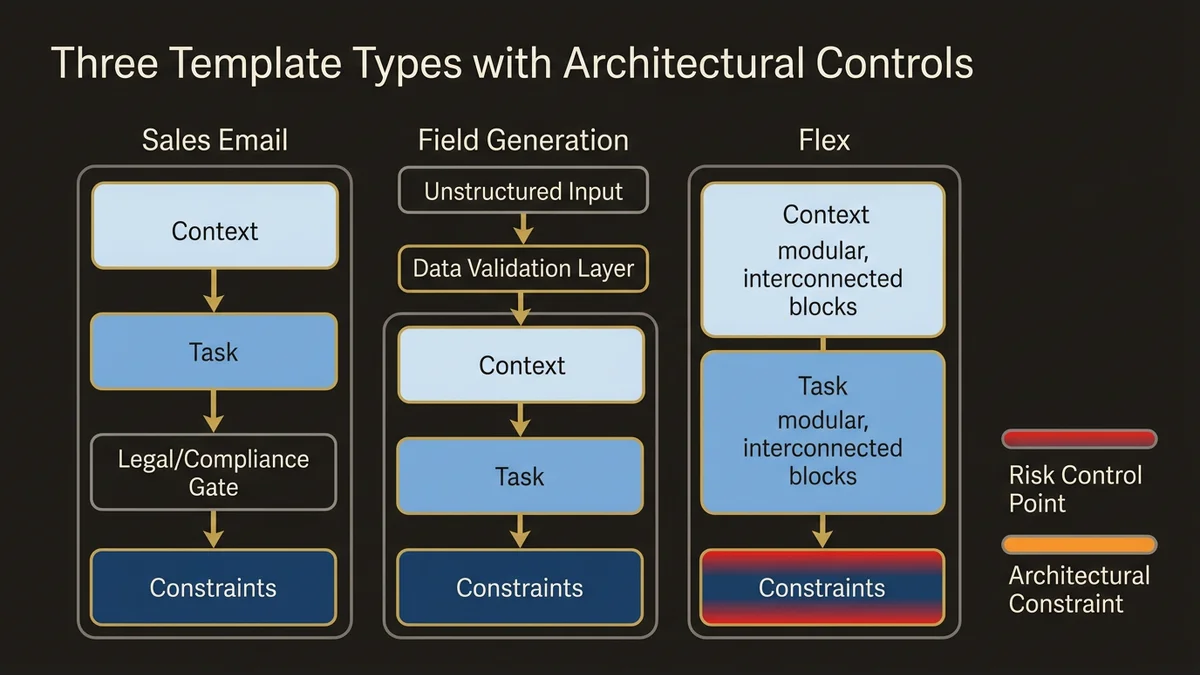
Sales Email templates generate customer-facing content. The risk is hallucination or off-brand messaging at scale. Structure the prompt in three sections: Context (what data the LLM receives), Task (what output to generate), Constraints (what not to do). Example structure:
Context: You are writing on behalf of {!$User.Name} to {!Contact.Name}.
Account tier: {!Account.Tier__c}
Recent activity: {!Account.Last_Activity__c}

Task: Write a follow-up email about {!Opportunity.Name}.

Constraints:
- Maximum 150 words
- Do not mention pricing
- Do not make commitments about delivery dates
- End with a specific question
The constraint section is the architectural control point. It prevents the LLM from generating content that requires legal review or creates support obligations. In orgs with compliance requirements, this section maps directly to approved messaging guidelines.
Field Generation templates populate CRM fields from unstructured data. The risk is data quality degradation. Structure these prompts with format specifications and fallback behavior:
Extract the primary pain point from this discovery call transcript:
{!Opportunity.Discovery_Notes__c}

Output format: Single sentence, maximum 100 characters
If no clear pain point exists, output: "Not identified"
Do not infer pain points not explicitly stated
The fallback behavior (“Not identified”) creates a signal for data quality monitoring. You can query for this value and identify opportunities that need human review.
Flex templates handle custom use cases and, critically, now power agent reasoning in Agentforce. When a Flex template backs an agent action, it merges live CRM and Data Cloud data at inference time, enabling context-specific decisions rather than generic outputs. This makes template quality a direct determinant of agent reliability. A Flex template that works acceptably in a human-triggered context will surface its ambiguities immediately when an agent calls it autonomously at volume.
The single-purpose rule matters more here than anywhere else. A prompt that “summarizes account history and suggests next actions and identifies risks” is three prompts pretending to be one. Split it. Each template becomes testable, reusable, and safe to wire into agent Topics and Actions. The Resources panel in Spring ‘26 Prompt Builder makes managing these inputs more tractable, but it doesn’t fix a poorly scoped template.
Grounding Data Strategy
The merge fields you include determine prompt quality and cost. Most architects include too much data. Start with the minimum required for the task. For a Sales Email template, that’s typically: recipient name, account name, opportunity name, user name. Test the output quality. Only add more fields if the output demonstrably improves.
Each additional merge field increases token consumption and latency. A prompt pulling 15 fields from 5 objects might consume 2,000 tokens of context before the LLM generates a single word. At 50,000 prompts per day, that’s 100M tokens of pure overhead.
The pattern that scales: create a “grounding data object” that pre-computes context. Instead of pulling 15 fields at prompt time, a Flow runs nightly and populates a single rich text field with formatted context. The prompt references one field. Token consumption drops significantly. The grounding data becomes versionable and auditable.
For Data Cloud implementations, use Calculated Insights to pre-compute prompt context. A Calculated Insight can aggregate customer interaction history, compute engagement scores, and format the result as structured text. The prompt references the insight. This moves computation from prompt time (expensive, slow) to batch time (cheap, fast). For agent-backed templates specifically, this pre-computation is not optional at scale — agents invoke prompts repeatedly across reasoning steps, and context bloat compounds.
Instruction Pattern Library
Consistent instruction patterns across templates create predictable LLM behavior. Maintain a shared instruction library that all templates reference.
Create a custom metadata type or custom setting that stores reusable instruction fragments: tone guidelines, constraint templates, format specifications. Templates reference these fragments through merge fields. When tone guidelines change, you update one record. All templates inherit the change. This is the difference between managing 200 independent prompts and managing a prompt system.
The instruction library also enables A/B testing. Create two versions of a tone guideline. Route 50% of prompts to each version. Measure output quality through user feedback or downstream conversion metrics. The winning pattern becomes the standard.
Testing and Validation Framework
Agentforce Testing Center provides the infrastructure for prompt validation. The pattern that works: maintain a test dataset that covers edge cases, and run it before every deployment.
For a Field Generation template that extracts pain points, the test dataset includes transcripts with clear pain points, transcripts with multiple pain points, transcripts with no pain points, and transcripts with implied but unstated pain points. Each has an expected output. A prompt that passes 95% of tests in development might fail 30% in production because the test dataset doesn’t cover real-world edge cases. The test dataset is the architectural artifact that matters most.
For agent-backed Flex templates, extend the test dataset to cover missing context scenarios. Agents will encounter records with incomplete data. A template that assumes a populated field will behave unpredictably when the field is blank. Explicit handling (“If this field is empty, respond with X”) belongs in the template, and the test dataset should verify it.
For customer-facing prompts, include brand compliance tests. Validate that outputs don’t contain banned phrases, maintain appropriate tone, and stay within length limits. This moves quality control from post-deployment review to pre-deployment validation.
Note: Prompt Performance Metrics are being deprecated in Summer ‘26. Orgs that built iteration workflows around those metrics need to shift toward test-dataset-driven validation and template library governance before that capability disappears.
Version Control and Rollback Strategy
Prompt Builder has no native version control. Store prompt templates in a Git repository. Each template is a text file with metadata (template type, merge fields, instructions). Changes go through pull requests with peer review. Deployment happens through Salesforce CLI or metadata API.
This creates three capabilities: diff tracking (what changed between versions), rollback (revert to last known good version), and audit trail (who changed what and why).
For orgs with multiple business units, branch-based development works well. Marketing maintains their prompt templates in a feature branch. Sales maintains theirs. Changes merge to main after review. Conflicts surface before deployment, not after.
One addition worth making explicit for Spring ‘26 onwards: as Agentforce Builder gains standard Topics and built-in actions, the boundary between “prompt template” and “agent configuration” blurs. Both belong in version control. An agent that references a prompt template creates a dependency that needs to be tracked. A rollback of the template without a corresponding rollback of the agent configuration that calls it will produce inconsistent behavior. Treat them as a unit.
Token Budget Management
Each prompt consumes tokens. At scale, token consumption becomes a cost and performance constraint. Measure baseline token consumption for each template. A Sales Email template might consume 500 tokens of context plus 200 tokens of output. At 10,000 executions per day, that’s 7M tokens.
Set token budgets per template. Create a custom object that tracks token consumption per template per day. A scheduled Flow queries the Agentforce usage API and populates this object. When a template exceeds its budget, it triggers an alert. This moves token management from reactive (surprise bills) to proactive (budget enforcement).
Key Takeaways
- Treat prompts as versioned, testable components, not ad-hoc text. Version control, automated testing, and deployment pipelines are the minimum viable architecture.
- Flex templates backing Agentforce agents require stricter scoping and explicit missing-context handling — agent invocation at volume exposes every ambiguity a human user would overlook.
- Minimize grounding data. Start with essential fields only, add more only if output quality demonstrably improves, and pre-compute context in Calculated Insights or custom fields.
- Build test datasets that cover edge cases before deploying prompt changes. With Prompt Performance Metrics disappearing in Summer ‘26, test-dataset-driven validation is the replacement governance mechanism.
- Maintain a shared instruction library across templates. Consistent patterns create predictable LLM behavior and enable system-wide updates without touching individual templates.
Need help with ai & agentforce architecture?
Design and implement Salesforce Agentforce agents, Prompt Builder templates, and AI-powered automation across Sales, Service, and Experience Cloud.
Related Articles

Agentforce Operations: Architecture Guide
Agentforce Operations redefines back-office automation. Here's the architectural blueprint for deterministic agent control planes at enterprise scale.

Salesforce Prompt Builder : bonnes pratiques
Prompt Builder mal configuré = agents Agentforce imprévisibles. Les bonnes pratiques architecturales pour éviter les pièges les plus coûteux.

Salesforce AI Specialist Cert Prep 2026
The Salesforce AI Specialist certification in 2026 tests architecture judgment, not recall. Here's how to prepare for what the exam actually measures.