
Most Customer 360 Data Cloud architecture patterns fail before they reach production. Not because the platform is wrong, but because teams treat Data Cloud as a data warehouse with a nicer UI rather than a real-time profile engine with specific structural requirements.
The gap between a working Customer 360 and a stalled one almost always lives in three places: how data streams are modeled, how identity resolution rulesets are configured, and whether Data Graphs are used to pre-compute joins or left as an afterthought. Get those three right and the rest follows. Get them wrong and you spend six months debugging why unified profiles don’t match what your CRM shows.
Why Most Data Cloud Implementations Stall at the Profile Layer
The standard implementation path goes like this: connect a few Data Streams, map fields to Data Model Objects, run Identity Resolution, declare victory. What actually happens is that Identity Resolution produces a Unified Individual count that’s either wildly inflated (because matching rules are too loose) or suspiciously low (because they’re too strict), and nobody trusts the output.
The root cause is treating Identity Resolution as a configuration step rather than an architectural decision. The matching rulesets that determine how the Unified Individual gets assembled are not neutral. Fuzzy email matching across B2C touchpoints behaves completely differently than deterministic matching on account hierarchy for B2B. Using the same ruleset for both is a common pattern in enterprise orgs that have both consumer and business segments in a single Data Cloud instance, and it produces garbage profiles for at least one of those segments.
The architecture that works here separates matching logic by data domain. B2C profiles use probabilistic matching on email, phone, and cookie identifiers with a high-confidence threshold. B2B profiles use deterministic matching on CRM Account ID as the primary key, with contact-level fuzzy matching only as a secondary pass. This requires deliberate DMO design upfront, not retrofitting after Identity Resolution has already run at scale.
How to Structure Data Streams for Reliable Unified Profiles
Data Streams are the ingestion layer, and the decisions made here cascade through everything downstream. The two failure modes are over-ingestion and under-normalization.
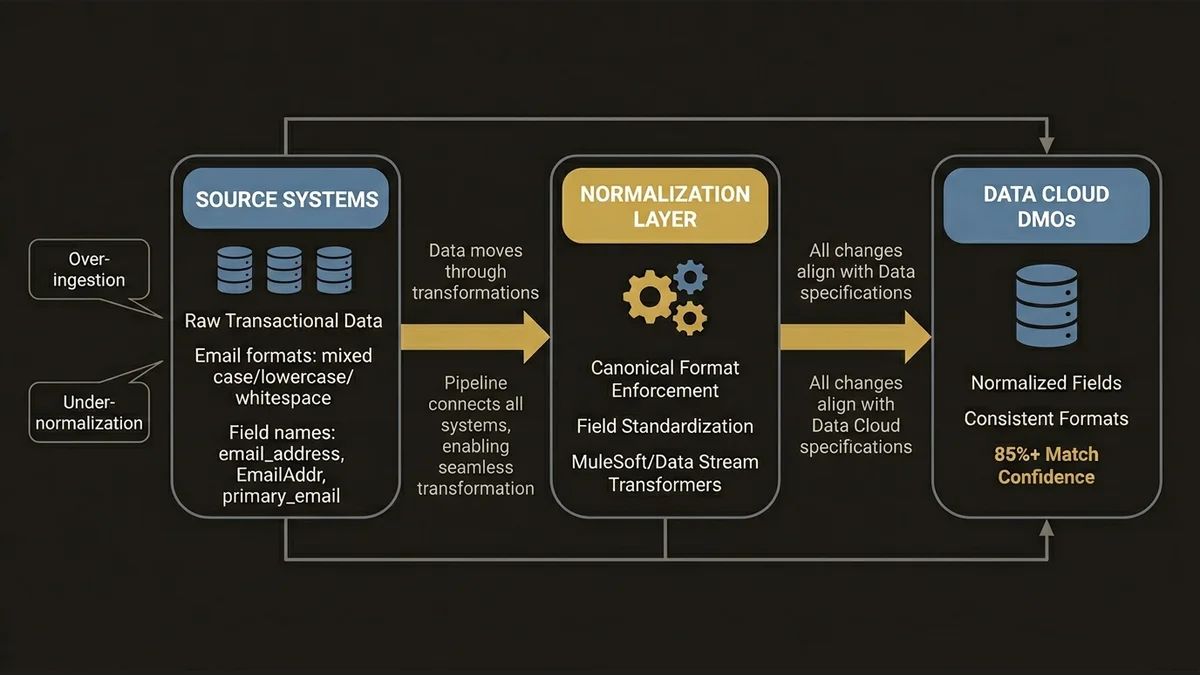
Over-ingestion means pulling raw transactional tables directly into Data Cloud without pre-aggregating at the source. At 3,000+ retail touchpoints, ingesting line-item transaction records rather than order-level summaries creates DMO tables with hundreds of millions of rows that Calculated Insights then have to scan in full. The latency compounds. Real-time activation windows that should be 2-5 minutes stretch to 15-20 minutes, which breaks any use case that depends on in-session personalization.
Under-normalization means mapping source fields to DMOs without enforcing semantic consistency. If one Data Stream sends email_address and another sends EmailAddr and a third sends primary_email, and all three map to the same DMO field, Identity Resolution can work with that. But if the formats differ (one is lowercase, one is mixed case, one has trailing whitespace), match rates drop and you get duplicate Unified Individuals that are actually the same person.
The pattern that holds up at scale is a normalization layer before Data Cloud ingestion. For MuleSoft-connected sources, this means a transformation policy on the API layer that enforces canonical field formats. For direct Data Stream connectors, it means using the Data Stream transformation capabilities to standardize before the data lands in DMOs. This is not glamorous work, but it’s the difference between 85% match confidence and 60%.
Data Graphs Are Not Optional for Real-Time Use Cases
This is where most implementations leave performance on the table. Data Graphs are materialized views that pre-compute joins across DMOs, and they are the mechanism that makes real-time profile lookups fast enough for activation use cases.
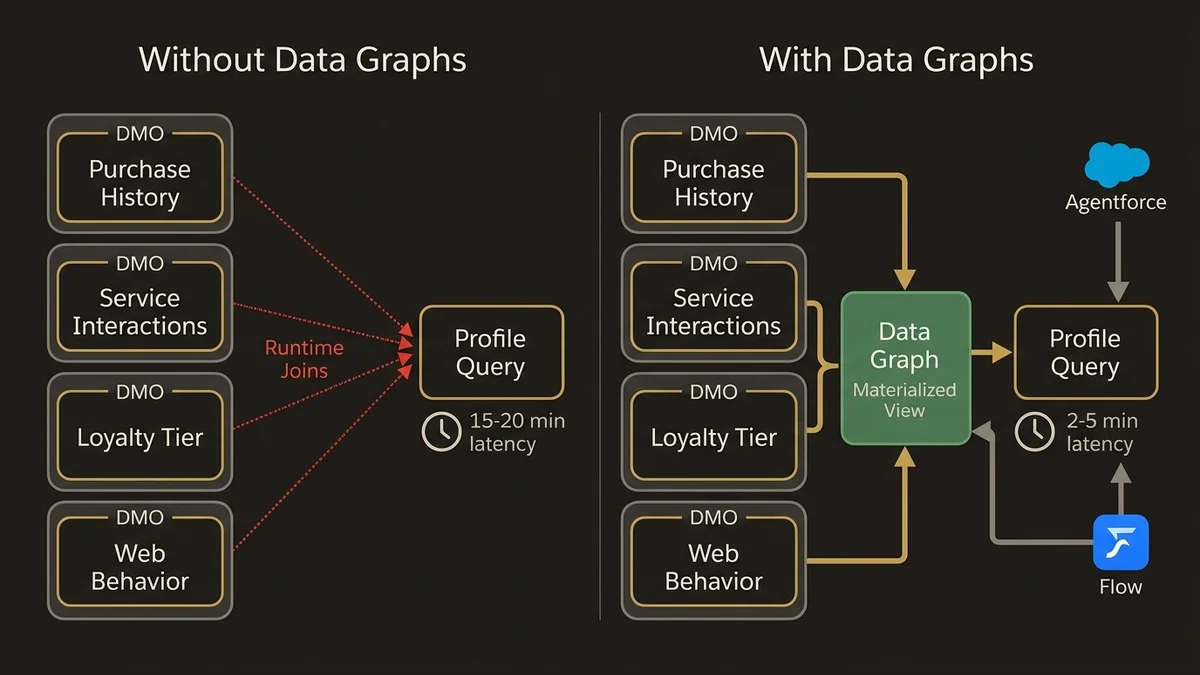
Without Data Graphs, every Agentforce action or Flow that queries a unified profile at runtime has to join across multiple DMOs on the fly. For a profile that aggregates purchase history, service interactions, loyalty tier, and web behavior, that’s four or five DMO joins per query. At low volume this is fine. At the scale where Data Cloud actually earns its cost, it becomes a bottleneck.
The architecture that works is to define Data Graphs around activation use cases, not around data availability. Start with the question: what does the agent or the Flow actually need to know at the moment of interaction? Build the Data Graph to answer that question specifically. A service deflection use case needs recent case history, product ownership, and channel preference. A commerce personalization use case needs purchase recency, category affinity, and loyalty status. These are different Data Graphs, and they should be maintained separately.
For teams building Agentforce on top of Data Cloud, the connection between Data Graphs and the Atlas Reasoning Engine is direct. The reasoning engine pulls profile context from Data Graphs at inference time. If the Data Graph is stale or missing key attributes, the agent’s reasoning is grounded in incomplete context, and the output quality degrades in ways that are hard to debug. The data-cloud-agentforce-foundation-architecture article covers this dependency in detail.
Calculated Insights: Where the Architecture Gets Expensive Fast
Calculated Insights are profile-level computed metrics, things like lifetime value, churn propensity score, days since last purchase, or average order value by category. They’re powerful and they’re the most common source of runaway Data Cloud compute costs.
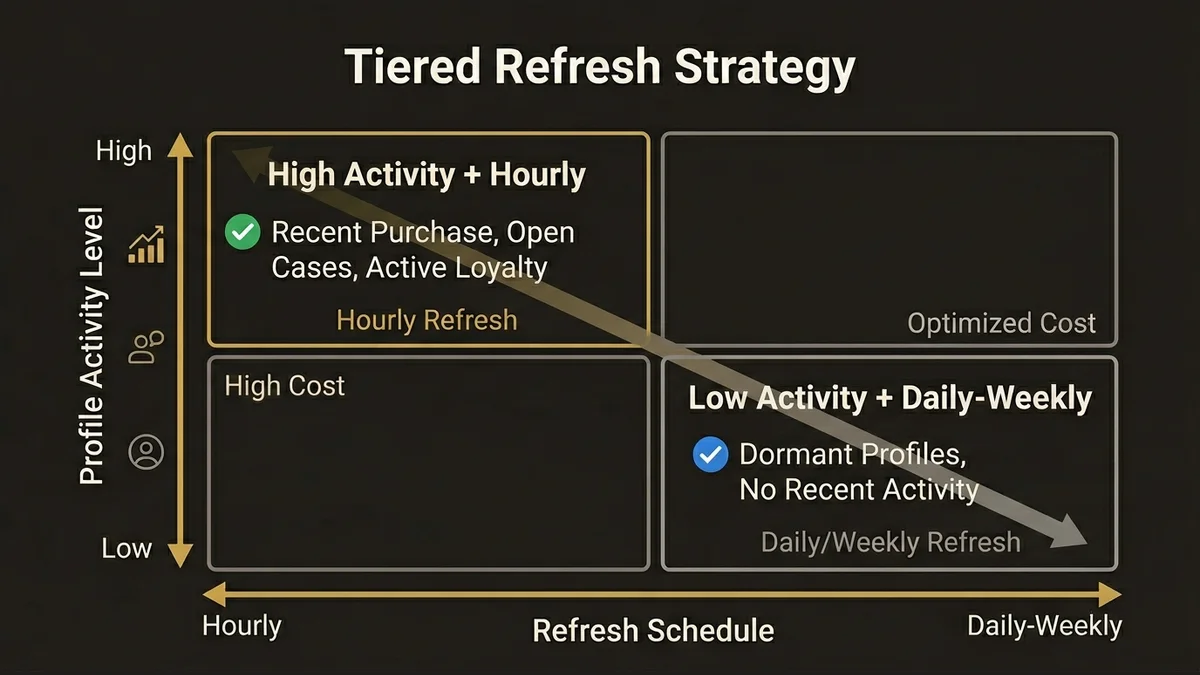
The problem is that Calculated Insights run on a schedule, and the default behavior is to recompute the full metric across all unified profiles on every run. For a metric like “days since last purchase,” recomputing across 10 million profiles every hour is expensive and mostly wasteful, because most profiles haven’t had a new purchase in the last hour.
The architecture that controls cost here is incremental computation where the metric logic supports it, combined with tiered refresh schedules based on profile activity. High-activity profiles (recent purchase, open service case, active loyalty tier) get hourly Calculated Insight refreshes. Dormant profiles get daily or weekly. This requires segmenting the profile population before the Calculated Insight runs, which is a more complex setup but pays for itself quickly at scale.
There’s also a design principle worth enforcing: Calculated Insights should not duplicate logic that already exists in CRM Analytics or an external data warehouse. A common anti-pattern in multi-cloud orgs is computing the same metric in three places and then wondering why the numbers don’t match. Designate Data Cloud Calculated Insights for real-time activation metrics specifically. Batch analytics and historical reporting belong in the warehouse.
Segmentation Architecture That Doesn’t Break Activation
Segments in Data Cloud are audience definitions built on top of unified profiles and Calculated Insights. The architectural mistake here is building segments that are too granular for the activation channel they’re feeding.
A segment with 47 filter conditions that produces an audience of 12,000 people is not inherently wrong, but if that segment is feeding a real-time personalization surface that needs to evaluate membership at page load, the evaluation latency becomes a problem. Segment membership for real-time surfaces should be pre-computed and stored as a profile attribute, not evaluated on demand.
The pattern that scales is a two-tier segmentation model. Broad strategic segments (loyalty tier, product category affinity, lifecycle stage) are maintained as Calculated Insights on the unified profile. Tactical campaign segments are built on top of those attributes rather than raw DMO fields. This keeps segment evaluation fast because it’s querying pre-computed values rather than joining raw transaction history.
For orgs running Data Cloud alongside Marketing Cloud or Commerce Cloud, segment activation through Data Cloud Segments should be the single path to audience delivery. Bypassing Data Cloud to build audiences directly in Marketing Cloud using CRM data is a pattern that creates consistency problems and defeats the purpose of having a unified profile layer. The salesforce-data-cloud-implementation-guide covers the activation pipeline mechanics in more depth.
If you’re evaluating whether the investment in this architecture is justified for your org’s scale, the /services/data-cloud-architecture page outlines where the architectural leverage points are.
Key Takeaways
- Identity Resolution rulesets must be domain-specific. Using a single matching configuration for both B2C and B2B profiles produces unreliable Unified Individuals. Separate the logic by data domain before running at scale.
- Data Streams require normalization before ingestion. Field format inconsistencies across sources degrade match rates in Identity Resolution. Enforce canonical formats at the transformation layer, not after the fact.
- Data Graphs are mandatory for real-time activation. Pre-computing joins via Data Graphs is what keeps profile lookups fast enough for Agentforce and Flow-driven use cases. Skipping this step works in demos and fails in production.
- Calculated Insights need tiered refresh schedules. Full recomputation across all profiles on every run is the most common source of unexpected Data Cloud compute costs. Segment by activity level and refresh accordingly.
- Segmentation should build on Calculated Insights, not raw DMOs. Tactical segments that query raw transaction history at evaluation time create latency problems on real-time surfaces. Pre-compute the attributes that segments depend on.
Need help with data 360 & multi-cloud architecture?
Unify customer data across Salesforce clouds with Data 360, build identity resolution models, and architect multi-cloud systems that actually work together.
Related Articles

Data Cloud Segmentation Strategy That Works
Most Data Cloud segmentation strategies fail before activation. Here's the architecture that prevents it, with specific patterns for enterprise orgs.

Data Cloud Integration: Sales & Service Cloud
How to architect Data Cloud integration with Sales and Service Cloud without creating a fragile, over-engineered mess. Patterns that hold at scale.

Data Cloud Consultant Certification Guide
The Salesforce Data Cloud consultant certification demands architectural depth most candidates underestimate. Here's what actually matters to pass.