
Most Data Cloud implementations stall because teams treat it as a data warehouse project. It’s not. Data Cloud is an operational data layer: the layer that resolves identity, materializes profiles, and serves data to Agentforce agents in under a second.
This Salesforce Data Cloud implementation guide covers the architectural decisions that determine whether your implementation becomes a production asset or an expensive replica of data you already have. The pattern is consistent across enterprise orgs: get ingestion right, build Identity Resolution rulesets that match your data reality, and design Data Graphs for the queries your downstream systems actually need.
The Problem: Data Unification Treated as ETL
The most common failure mode isn’t technical. It’s conceptual. Teams approach Data Cloud like a traditional ETL project: extract data from source systems, transform it, load it into a central store. Build dashboards. Done.
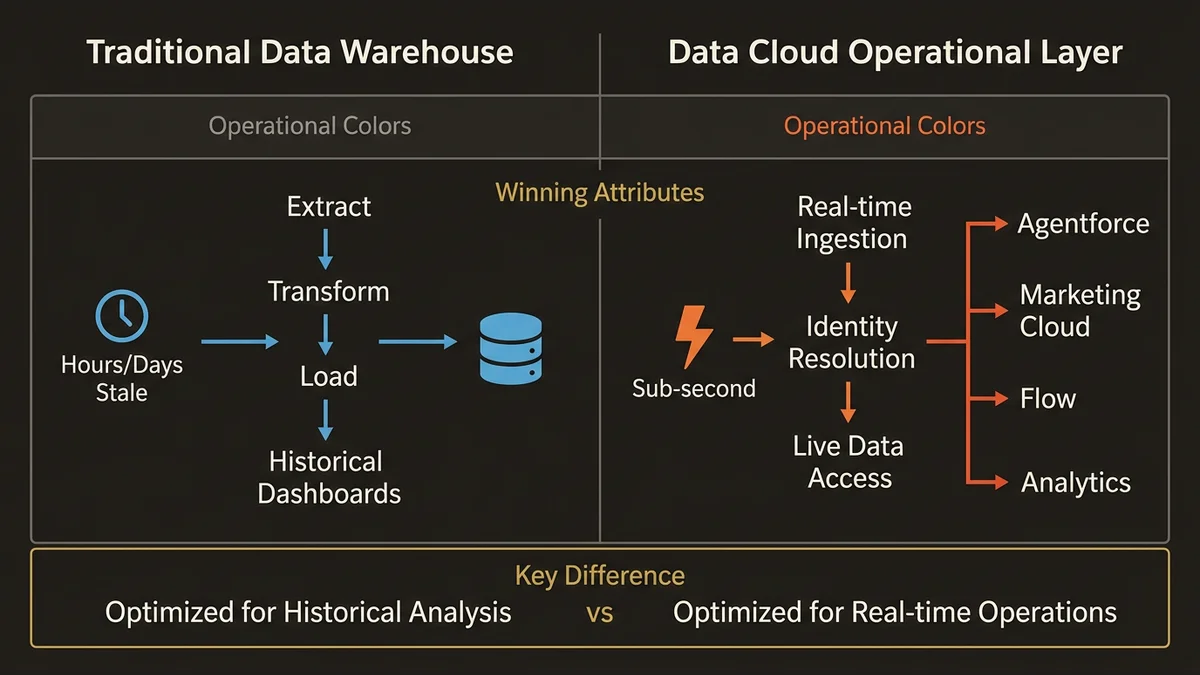
Data Cloud isn’t a warehouse. It’s a real-time unification layer that sits between your source systems and every downstream consumer: Agentforce agents, Marketing Cloud journeys, Flow automations, and analytics. The architectural distinction matters: a warehouse is optimized for analytical queries on historical data. Data Cloud is optimized for operational identity resolution, real-time segmentation, and sub-second data retrieval during agent conversations.
When you design for warehouse patterns, you get warehouse outcomes: historical reporting that’s hours or days stale. When you design for operational patterns, you get a unified data foundation that powers real-time decisions across every cloud. The mistake isn’t choosing the wrong technology. The mistake is importing the wrong mental model.
Ingestion Architecture: Data Streams and Refresh Strategy
Every Data Cloud implementation starts with the same question: what data goes in, how does it get there, and how fresh does it need to be?
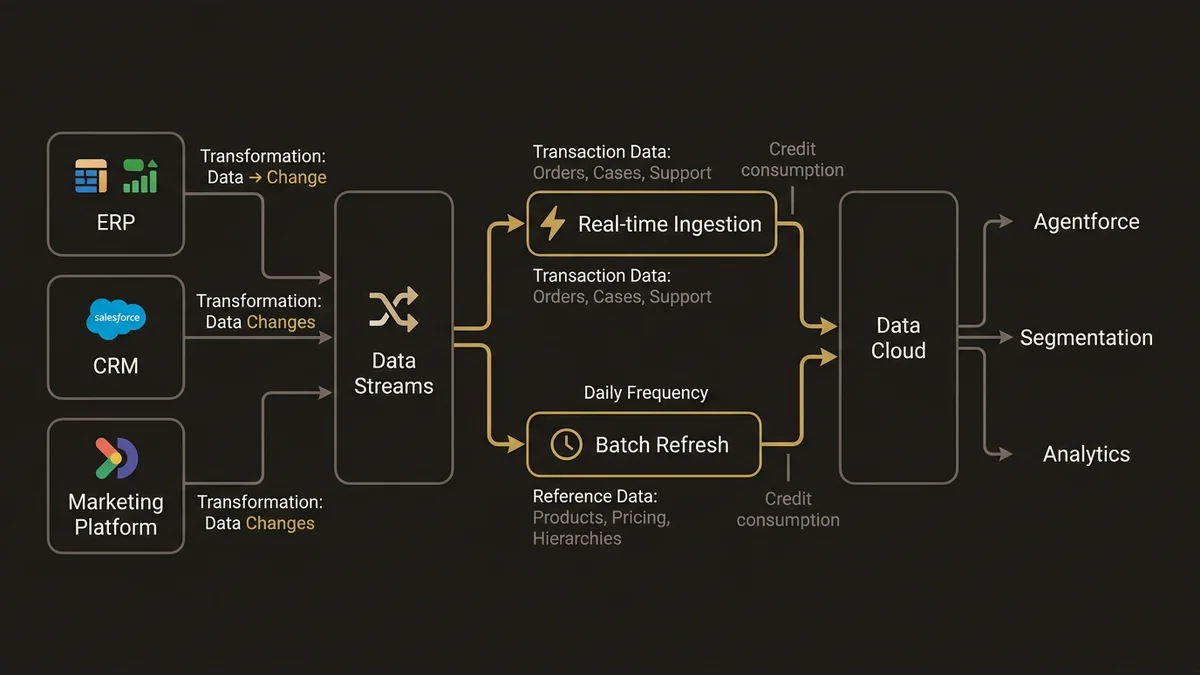
Data Streams are the ingestion mechanism. Each stream connects a source system to Data Cloud and maps source fields to Data Model Objects. The architectural decisions that matter:
Source prioritization. You don’t ingest everything. Start with the data your downstream consumers actually need. If your first use case is Agentforce service agents, you need cases, contacts, orders, and product records. If it’s marketing segmentation, you need engagement events, purchase history, and consent records. Ingesting your entire ERP on day one is how implementations stall in month two.
Refresh frequency. This is where most teams make expensive mistakes. Real-time ingestion consumes significantly more Data Cloud credits than batch. Not every data source needs real-time updates. Transaction data (orders, cases, support interactions) needs real-time. Reference data like product catalogs, pricing tables, and org hierarchies needs daily batch at most. Historical data from closed opportunities three years ago needs a one-time load with periodic refresh.
Connector selection. At 7+ source systems, raw Ingestion API calls are the wrong choice. MuleSoft wins on error handling, retry logic, and data transformation that programmatic API integration doesn’t give you. CRM connectors pull directly from Salesforce orgs; for external systems (ERP, billing, custom databases), the choice is the Ingestion API for narrow programmatic control or MuleSoft for managed integration past that threshold. Winter ‘26 also introduced consumption forecasting via Data Cloud One for companion orgs, which gives architects a clearer picture of credit burn before it becomes a billing surprise.
A common pattern in enterprise orgs: start with two or three Salesforce CRM connectors on real-time refresh (Service Cloud cases, Sales Cloud opportunities, contact data). Add external systems incrementally as each downstream use case demands them. This approach keeps credit consumption predictable and prevents the “boil the ocean” failure mode that kills implementations before they deliver value.
Identity Resolution: Building the Unified Profile
Identity Resolution is the architectural core of Data Cloud. Without it, you have duplicated records from different systems sitting in the same platform. With it, you have a Unified Individual, a single customer profile that every downstream system references.
The implementation pattern: define matching rulesets that specify how records from different sources get linked to the same individual. This is where architectural precision matters more than anywhere else.
Exact matching rules compare deterministic identifiers: email address, phone number, loyalty ID, Salesforce Contact ID. These are high-confidence, low-ambiguity matches. A customer with the same email in Service Cloud and Commerce Cloud is almost certainly the same person.
Fuzzy matching rules handle the real world: typos, name variations, incomplete data. Matching “Sébastien” to “Sebastien” or “123 Rue de Rivoli” to “123 R. de Rivoli” requires probabilistic matching with configurable confidence thresholds. Set thresholds too low, and you merge distinct customers into one profile. Set them too high, and the same customer stays fragmented across systems.
The architectural mistake most teams make: starting with aggressive fuzzy matching across all fields. The ruleset that works for enterprise orgs is exact match on email and phone as the primary layer, with conservative fuzzy matching on name plus normalized address as a secondary layer. Run the ruleset against a representative sample, manually review merge quality, then adjust thresholds before scaling to the full dataset.
At the scale of 8M+ records across multiple source systems, Identity Resolution run time becomes an operational concern. Partition matching rulesets by region or business unit if full-dataset runs exceed acceptable processing windows. The goal is a unified profile that’s accurate, not just fast.
Data Graphs and Calculated Insights: The Query Layer
Once data is ingested and identities are resolved, Data Graphs define how that data gets consumed. A Data Graph combines Data Model Objects into materialized views, pre-computed relationship maps that respond in sub-second timeframes.
This is where Data Cloud connects to Agentforce. When an agent needs to answer “Where’s my order?”, it doesn’t query five different systems. It queries a Data Graph that maps the path from Unified Individual to Order to Shipment to Tracking Event. The data is pre-joined, pre-filtered, and ready for retrieval.
Design Data Graphs for your queries, not your schema. A common antipattern is building a single monolithic Data Graph that mirrors your entire data model. This creates a massive materialized view that’s expensive to maintain and slow to refresh. Build focused graphs for specific use cases: one for service agent context (customer to cases to orders to products), another for sales intelligence (account to opportunities to contacts to engagement history), a third for marketing activation (individual to segments to preferences to consent).
Calculated Insights turn transactional data into operational metrics. Lifetime value, purchase frequency, average order value, days since last engagement, churn risk score. These are computed at the profile level and refresh as new data arrives. The architectural decision: which metrics get computed as Calculated Insights (available for segmentation, personalization, and agent reasoning) versus which get computed in downstream analytics tools.
The rule of thumb: if a metric drives real-time decisions (agent behavior, journey triggers, segmentation criteria), compute it as a Calculated Insight in Data Cloud. If it’s for retrospective analysis (quarterly reporting, board decks), compute it in your analytics layer. Blurring this line is how Data Cloud credit consumption spirals beyond budget.
Spring ‘26 extends this operational pattern with Flow Logging in Data Cloud. Flow execution data streams directly into Data Cloud for centralized monitoring, giving architects visibility into automation performance alongside customer data. Pair this with the enhanced metadata handling and CI/CD tooling introduced in Spring ‘26 (version-controlled artifacts, modular bundles via Salesforce DX, Copado, or Gearset) and you have a more auditable, maintainable implementation than was possible a year ago.
Pitfalls: What Breaks Data Cloud Implementations
Ingesting everything on day one. Data Cloud credits are consumed by ingestion volume and refresh frequency. Teams that ingest every object from every source system immediately burn through credits before delivering a single use case. Ingest in service of specific downstream needs, not for completeness.
Skipping Identity Resolution tuning. Running Identity Resolution with default settings produces either over-merged profiles (distinct customers collapsed into one) or fragmented profiles (same customer appearing as five records). Both outcomes degrade every downstream consumer: agents, segments, journeys. Budget two to three weeks for matching ruleset tuning and validation on representative data before scaling.
Building Data Graphs after deployment. Data Graphs should be designed during architecture, not added retroactively. If your Agentforce agents are live before Data Graphs are configured, agents query raw Data Model Objects with higher latency and less context. Design the graph structure during implementation, alongside agent topic and action design.
Treating Data Cloud as isolated from CRM. Data Cloud is natively integrated with the Salesforce Platform. Unified profiles, segments, and Calculated Insights are accessible in Flow, Apex, and Agentforce without additional integration work. Teams that build custom APIs to move data between Data Cloud and CRM are adding complexity where none is needed.
Ignoring credit economics. Real-time refresh, large Data Graphs, and high-volume Calculated Insights all consume credits. The architecture that survives past procurement is one where credit consumption is modeled during design, not discovered during the first invoice.
Key Takeaways
- Operational, not analytical. Design for real-time unification and sub-second retrieval; warehouse-style batch reporting is a different system.
- Start ingestion with the data your first downstream consumer actually needs. Add sources incrementally. Use Data Cloud One consumption forecasting before you commit.
- Identity Resolution requires tuning, not just configuration. Exact matching first; conservative fuzzy matching second; validate merge quality before scaling.
- Data Graphs serve queries, not schema. Build focused, use-case-specific graphs during architecture rather than monolithic mirrors after agent deployment.
- If a metric drives real-time decisions (agents, journeys, segments), it’s a Calculated Insight in Data Cloud. If it’s for board decks, keep it in your analytics layer.
- Credit management is architecture. Refresh frequency, ingestion volume, and Data Graph complexity all consume credits.
Need help with data 360 & multi-cloud architecture?
Unify customer data across Salesforce clouds with Data 360, build identity resolution models, and architect multi-cloud systems that actually work together.
Related Articles

Data Cloud Segmentation Strategy That Works
Most Data Cloud segmentation strategies fail before activation. Here's the architecture that prevents it, with specific patterns for enterprise orgs.

Data Cloud Integration: Sales & Service Cloud
How to architect Data Cloud integration with Sales and Service Cloud without creating a fragile, over-engineered mess. Patterns that hold at scale.

Data Cloud Consultant Certification Guide
The Salesforce Data Cloud consultant certification demands architectural depth most candidates underestimate. Here's what actually matters to pass.