
Most Salesforce Data Cloud segmentation strategy work collapses at the activation layer, not the data layer. The segments build fine. The audiences look correct in preview. Then they hit Marketing Cloud or Personalization and the match rates are 40% lower than expected, the refresh cadence is wrong, and nobody can explain why.
The problem is almost never the segment definition itself. It’s the architecture underneath it.
Why Segment Definitions Are the Wrong Starting Point
The instinct in most implementations is to start with the business question: “Give me all customers who purchased in the last 90 days and haven’t opened an email in 30.” That’s a valid use case. But building a segment before the Identity Resolution rulesets are stable, before the Data Graphs are materialized correctly, and before the Unified Individual profile is actually unified, means you’re querying noise.
In enterprise orgs with multiple ingestion pipelines, the Unified Individual can contain conflicting signals. A customer who exists in both an e-commerce system and a loyalty platform may resolve to two separate Unified Individuals if the matching ruleset prioritizes email match over phone match and the two systems use different email formats. Your segment then undercounts by exactly that population, and the error is invisible unless you’re auditing Identity Resolution match rates explicitly.
The architecture that works here starts with Identity Resolution validation before any segment is built. Run the ruleset, inspect the match rate distribution, and confirm that the Unified Individual count is within expected range of your known customer base. If you have 2 million known customers and Identity Resolution is producing 2.4 million Unified Individuals, you have a fragmentation problem that will corrupt every segment downstream.
How Data Graphs Change the Segmentation Performance Equation
Segments in Data Cloud query Data Model Objects at runtime by default. For simple filters on a single DMO, that’s fine. For enterprise segmentation with multi-hop joins, purchase history aggregations, and behavioral event counts, it’s a performance problem that compounds as your data volume grows.
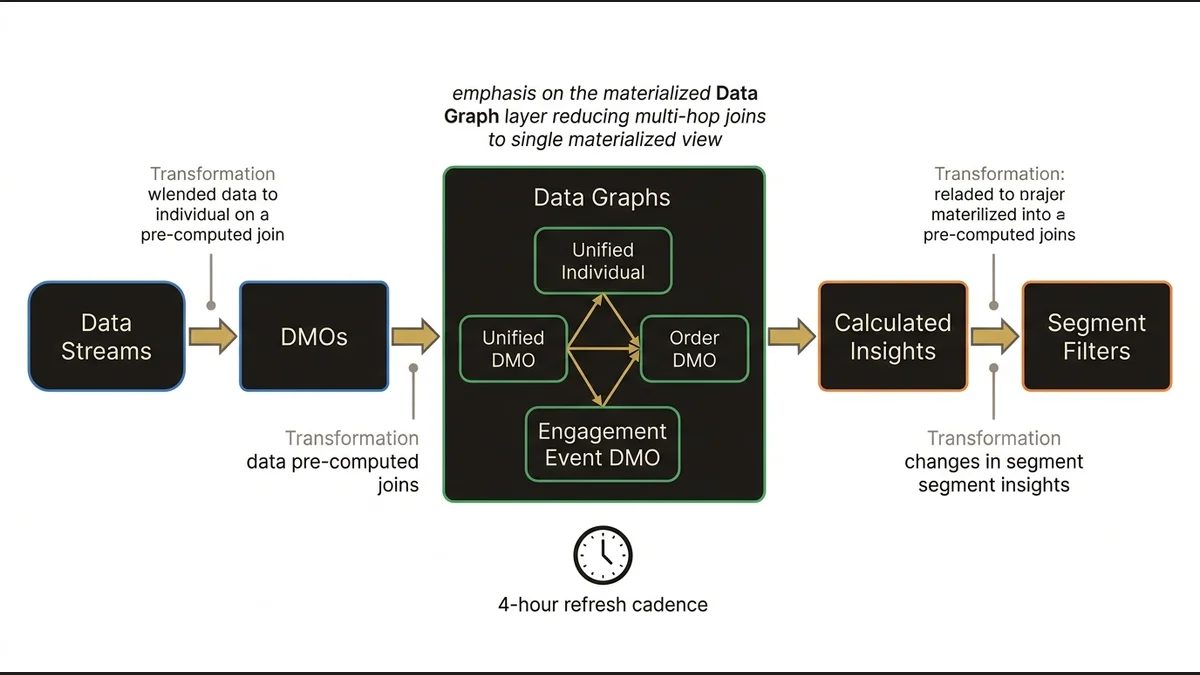
Data Graphs solve this by materializing pre-computed joins between DMOs. The architectural decision is which relationships to materialize and at what granularity. A Data Graph that pre-joins the Unified Individual to the Order DMO and the Engagement Event DMO means that a segment filtering on “3+ purchases AND email open in last 14 days” resolves against a single materialized view rather than executing three separate joins at query time.
The tradeoff: Data Graphs have a refresh cadence, and that cadence determines how stale your segment inputs can be. For real-time activation use cases, a Data Graph refreshing every 4 hours introduces a lag that may be architecturally unacceptable. For batch-oriented campaigns, it’s irrelevant. The decision about which relationships to materialize in a Data Graph should be driven by activation latency requirements, not by what’s convenient to model.
Calculated Insights compound this. A Calculated Insight that computes lifetime value or engagement score at the Unified Individual level is a profile-level metric that can be used as a segment filter. But Calculated Insights run on a schedule, and if your segment depends on a Calculated Insight that hasn’t refreshed since yesterday, your “high-value customers” filter is operating on yesterday’s scores. In practice, orgs that don’t explicitly map the refresh dependency chain between Data Streams, Data Graphs, and Calculated Insights end up with segments that are internally inconsistent in ways that are hard to diagnose.
(The data-cloud-identity-resolution-architecture article maps the full dependency model between Identity Resolution and downstream DMO consistency.)
Activation Architecture Determines Whether Segments Are Actually Useful
A segment that exists only inside Data Cloud is a reporting artifact. The value is in activation, and activation architecture is where most implementations make decisions they later regret.
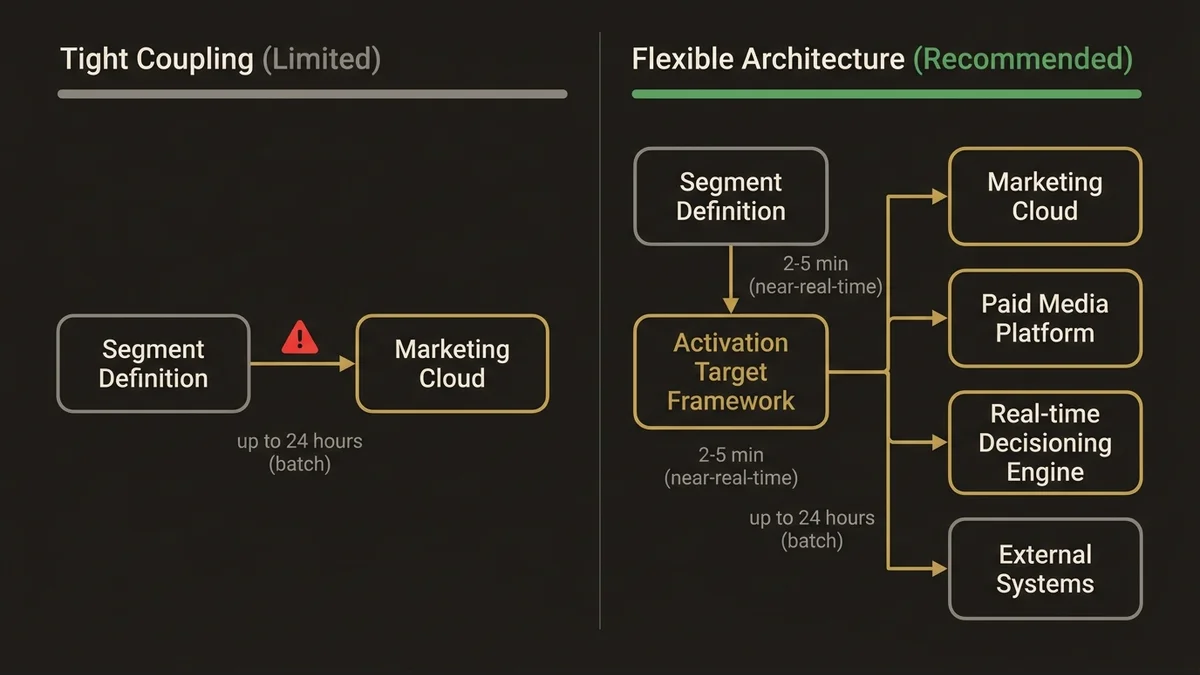
The two primary activation patterns are direct activation to Marketing Cloud via the native connector, and activation to external systems via Data Cloud’s activation targets using Data Streams. The native Marketing Cloud connector is simpler to configure but creates a tight coupling that limits flexibility. If you later want to activate the same segment to a paid media platform or a real-time decisioning engine, you’re building a second activation path from scratch.
The more defensible architecture uses Data Cloud’s activation target framework as the canonical output layer, with Marketing Cloud as one target among several. This means the segment definition is written once, and the activation logic is handled by the target configuration rather than baked into the segment itself. At scale, this matters: orgs managing 200+ active segments across multiple activation channels cannot afford to maintain parallel segment definitions for each channel.
Activation latency is the other variable that gets underestimated. The typical latency for a segment to propagate from Data Cloud to an activation target in a well-configured enterprise org is 2-5 minutes for near-real-time targets and up to 24 hours for batch targets depending on the refresh schedule. If your use case requires sub-minute activation, Data Cloud’s native segmentation is not the right tool. Platform Events or a real-time decisioning layer sitting in front of Data Cloud is the correct architecture for that latency requirement.
The Governance Problem That Kills Segmentation at Scale
Segment proliferation is the silent killer of Data Cloud implementations. It starts with a handful of well-defined segments for core campaigns. Within 18 months, orgs with active marketing teams typically accumulate 300-500 segments, many of which are near-duplicates, many of which reference deprecated Calculated Insights, and some of which are actively querying DMOs that no longer receive data.
The governance architecture that prevents this has three components. First, a segment naming convention that encodes the owning team, the primary DMO, and the intended activation channel. This sounds trivial but it’s the difference between being able to audit your segment inventory in 20 minutes versus 3 days. Second, a deprecation policy tied to activation history: any segment that hasn’t been activated in 90 days should be flagged for review, not left to accumulate. Third, ownership assignment at the segment level, not just at the Data Cloud org level. When a segment has no owner, it has no accountability, and it will never be cleaned up.
The salesforce-data-cloud-implementation-guide covers the broader governance framework for Data Cloud, but segmentation governance specifically requires its own policy layer because segments are the most user-facing artifact in the platform and the most likely to be created without architectural review.
For orgs building out this capability at scale, the architectural decisions around segment governance are as consequential as the technical ones. See /services/data-cloud-architecture for the patterns that hold up at enterprise volume.
What Most Implementations Get Wrong About Segment Refresh
The default assumption is that more frequent segment refresh equals better targeting. This is wrong in two ways.
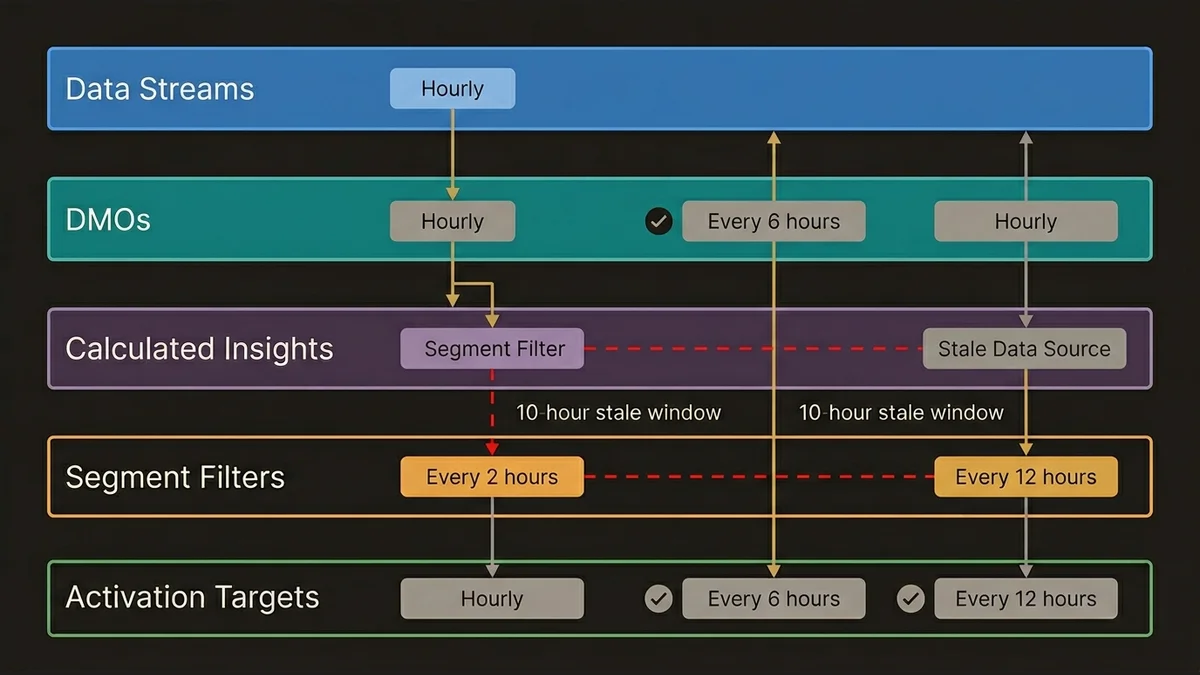
First, frequent refresh increases compute consumption, which has cost implications at scale. A segment refreshing every hour against a large Unified Individual population with complex Calculated Insight dependencies will consume significantly more Data Cloud credits than the same segment refreshing every 6 hours. The refresh cadence should be set based on the activation cadence of the downstream channel, not on a generic “fresher is better” assumption.
Second, and more importantly, mismatched refresh cadences between segments and their dependent Calculated Insights create logical inconsistencies. If a segment refreshes every 2 hours but the Calculated Insight it depends on refreshes every 12 hours, the segment is producing results based on stale inputs for 10 of every 12 hours. The segment appears to be running correctly because it completes without errors. The outputs are just wrong.
The correct architecture maps the full dependency chain: Data Streams feed DMOs, DMOs feed Calculated Insights, Calculated Insights feed segment filters, segments feed activation targets. Each layer has a refresh cadence, and those cadences need to be explicitly coordinated rather than set independently. In practice, this means the segment refresh schedule is the last thing you configure, after every upstream dependency has a defined and stable cadence.
Key Takeaways
- Validate Identity Resolution match rates before building any segments. Fragmented Unified Individuals corrupt every downstream audience definition silently.
- Data Graphs are not optional for complex segmentation at enterprise scale. Materializing the right DMO relationships reduces query time and makes multi-filter segments operationally viable.
- Build activation architecture before segment definitions. The choice between native connectors and activation targets determines how much rework you’ll do when the second or third channel comes online.
- Segment refresh cadence should be derived from the activation channel’s consumption pattern, not set independently. Mismatched cadences between segments and Calculated Insights produce logically inconsistent outputs that don’t surface as errors.
- Without explicit governance, segment proliferation is inevitable. Naming conventions, deprecation policies, and ownership assignment are architectural decisions, not administrative overhead.
Need help with data 360 & multi-cloud architecture?
Unify customer data across Salesforce clouds with Data 360, build identity resolution models, and architect multi-cloud systems that actually work together.
Related Articles

Data Cloud Integration: Sales & Service Cloud
How to architect Data Cloud integration with Sales and Service Cloud without creating a fragile, over-engineered mess. Patterns that hold at scale.

Data Cloud Consultant Certification Guide
The Salesforce Data Cloud consultant certification demands architectural depth most candidates underestimate. Here's what actually matters to pass.

Customer 360 Data Cloud Architecture Patterns
Most Customer 360 Data Cloud implementations fail at the data model layer. Here's the architecture that actually works at enterprise scale.